
AI meeting notes that actually understand your industry
The meeting notetaker that knows a sprint from a site visit
LASK records, transcribes, and drafts your meeting recaps and action items, using AI context tuned to how your team actually works instead of a one-size-fits-all template. Fully EU-capable, encrypted at rest, consent built in.
No credit card required, free plan included

Why teams switch to LASK
AI that learns your vocabulary
Teach LASK your acronyms, your client names, your jargon, and every recap after that gets it right instead of guessing.
Structured for how your industry runs meetings
27 meeting-type templates across 5 industries mean a standup recap and a client review recap don’t look like the same generic form.
Built EU-first, not bolted on after
Choose EU-sovereign transcription and extraction, encrypted storage, and consent enforced before a recording can even start.
What LASK does
Built to actually replace your note-taking, not just record it
Every feature below exists because a generic meeting-notes tool wasn't precise enough for the industries LASK is built for.
Custom AI context
Teach LASK your firm's acronyms, jargon, and client or project names once, and every recap after that uses them correctly instead of guessing.
27 templates, 5 industries
Every meeting type gets a structure built for it: a standup, a client review, and a site visit don’t come back looking like the same generic form.
Consent, enforced, not suggested
Recording is blocked at the API level until every invited attendee has consented. There's no client-side checkbox to override it.
Encrypted at rest
Transcripts and recaps are encrypted in storage, not just in transit: the same standard applied to every credential LASK holds.
EU-sovereign processing, one toggle
Route transcription and AI extraction through EU-based providers instead of the US default, whenever data residency matters to you.
Everything in one place
Clients, projects, timesheets, and meeting history: stop stitching together a notetaker, a doc, and a spreadsheet for the same engagement.
How it works
From "recording" to "done" in three steps
Schedule or start a meeting
Plan it in LASK with your attendees, or hit "Record now" the moment an ad-hoc call starts. Either way, LASK is ready.
LASK records, transcribes & drafts
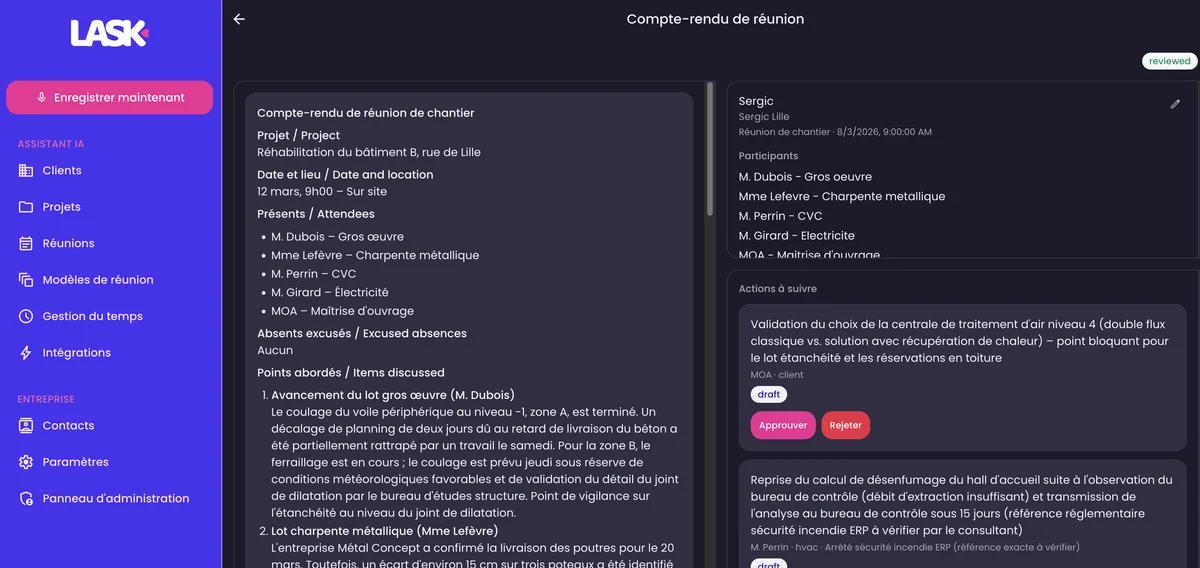
Once every attendee has consented, LASK transcribes the conversation and drafts a structured recap using your industry's template and your own custom context.
Review, edit, and it's done
Skim the draft, adjust anything that needs it, and the recap (plus every action item) is ready to share or push to your other tools.
Built for your industry
See LASK built for how you actually work
Same product, different starting point: pick the page written for your team.
construction professionals & project managers
The first notetaker built specifically for construction professionals
See howengineering & product teams
Stop writing meeting recaps. Start shipping code.
See howaccounting & finance teams
Every number, every client commitment, captured exactly right
See howconsulting & advisory firms
Walk into every client meeting. Walk out with the deliverable already drafted.
See howAlready using LASK


Made in Europe
Data protection isn't a checkbox we ticked once
LASK is built EU-first: from where your data can be processed, down to how a single recording gets deleted. Working toward ISO 27001 certification on top of what's already shipped below.


EU-sovereign by choice
Pick EU-based providers for both transcription and AI extraction instead of the US default, whenever data residency is non-negotiable.
Encrypted at rest
Recordings, transcripts, and recaps are encrypted in storage, not just protected in transit like a lot of "secure" tools stop at.
Consent enforced, not assumed
A meeting can’t be recorded until every invited attendee has consented: enforced by the API itself, with no override.
Automatic 30-day audio deletion
Raw recording audio is permanently deleted 30 days after the meeting by default. The recap and transcript stay; the audio doesn’t linger.
Your data, exportable on request
Admins can request a full export of everything an organization has stored, and any user can delete their own account at any time.
Every sensitive action, logged
Deletions, exports, and plan changes are recorded in an audit trail admins can review: accountability, not just a policy document.
FAQ
Frequently asked questions
The questions we actually get asked, answered straight, no sales call required.
How is LASK different from Microsoft Teams or Copilot?
Copilot only produces a recap when everyone is already in a Teams call, and plenty of real meetings aren't. It also writes a generic summary, where you need a structured recap with action items attributed to the right person. LASK is built specifically for that, at roughly half Copilot's per-seat price.
Will our clients agree to be recorded?
LASK won't start recording until every invited attendee has explicitly consented: that's enforced in the product itself, not left to a settings checkbox. Processing can stay in the EU, raw audio is deleted automatically after 30 days, and every sensitive action is logged. In practice, "I'll record so you get an accurate recap today" is an easy ask, because your client is the one who benefits.
What if the AI gets something wrong in the recap?
Nothing gets sent automatically. Every draft is reviewed and approved by a person before it goes anywhere, and anything sensitive is flagged for human review rather than asserted outright. A draft built from the full transcript and checked by you in a few minutes is typically more accurate than notes reconstructed from memory afterwards.
We tried an AI notetaker before and the summaries were generic. What's different here?
That's a fair complaint about generic notetakers, and it's the gap LASK is built to close. Instead of one template for every meeting, LASK uses templates tuned to your industry, plus your own acronyms, client names, and jargon, taught once and applied to every recap after that.
Is LASK GDPR-compliant? Where is our data stored?
Yes. You can choose EU-based providers for both transcription and AI processing, data is encrypted at rest, raw audio is deleted after 30 days by default, every sensitive action is logged in an audit trail, and admins can export or delete an organization's data on request. A DPA is available for business customers.
How long can a meeting be?
It depends on your plan: see the plan matrix on the pricing page for current limits. If a meeting runs long, you can always split it into two recordings and LASK will still produce a recap for each.
Will this actually save us time, or just move the work around?
On a fixed-fee engagement, time saved writing minutes is pure margin. If you bill by the hour, you're not billing less: you're redeploying that time to billable client work, and getting the recap out the same day is a service difference clients notice.
Does LASK work for noisy, in-person meetings, not just video calls?
Yes, a phone or laptop microphone on the table works well for most in-person meetings. In a noisy room, a small external microphone makes a real difference. LASK isn't built for meetings held next to active machinery or during a walkabout, and nothing handles that well, so we won't pretend otherwise.
Does LASK handle French, Dutch, or mixed-language meetings?
French is fully supported: the interface, recap templates, and jargon glossaries are built in French, not translated from English. Mixed-language meetings work too, though very rapid code-switching between languages can reduce accuracy. You're welcome to test this on a real recording before deciding.
What happens to our data if LASK shuts down or is acquired?
You can export everything (every recording, transcript, recap, and action item) at any time, with no lock-in. That export already exists; it isn't a promise for later.
Do we need to buy a seat for every employee?
No, only the people who actually run or attend meetings need a seat. Most teams start with the handful of people who chair meetings and add more seats later as it proves out.
How long does setup take?
Most teams record their first meeting within minutes of signing up: connect your calendar, add your team, and you're ready. Importing existing clients and projects, or teaching LASK your team's vocabulary, can happen gradually as you go.
Does LASK integrate with the tools we already use?
Yes, Google Calendar, Outlook, Microsoft Teams, Slack, Notion, Google Drive, Dropbox, Monday, and Trello are all supported today, so recaps and action items land where your team already works.
Can we record internal or staff meetings, not just client meetings?
You can, but recording employees can raise separate legal considerations depending on your jurisdiction and works council rules, so it's worth a quick check with your own counsel first. Either way, LASK gives you the mechanism to do it properly: per-attendee consent enforced before recording starts, a full audit trail, and automatic deletion.
Can we try LASK before committing to a paid plan?
Yes, start on the free plan, no credit card required. Or send us a real recording from one of your own meetings and we'll send back the recap, so you can judge the actual output before deciding anything.
Can we cancel or change plans later?
Any time. There's no long-term lock-in: you can downgrade back to the free plan whenever you like, and your data is always yours to export.